
Here is a quick cheat sheet about NetStat that I gathered from the video I share at the bottom of this post. NetStat is a very useful tool for managing system network connection ports among other things.
NetStat Basic Commands
| Command | Explanation |
|---|---|
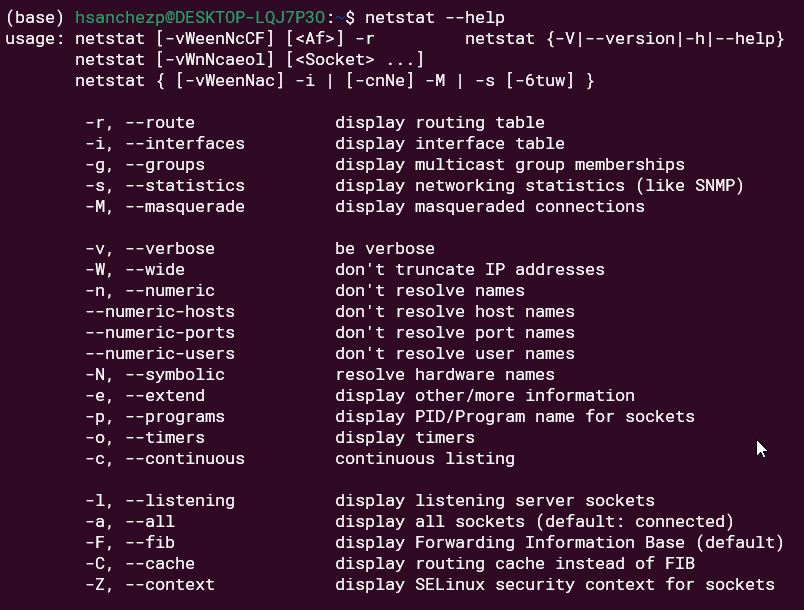
| netstat –help | Help |
| netstat -ie | Displays the Network Interface. Similar to what the ipconfig command does on Windows or the ifconfig does on Linux. It shows all the interfaces we have running |
| netstat -r | Display Current Routing Table |
| netstat -a | Displays all active TCP connections and the TCP and UDP ports on which the computer is listening, regardless of the state |
| netstat -at | It shows all the active TCP internet connections regardless of the state |
| netstat -n | Displays active TCP connections, however, addresses and port numbers are expressed numerically and no attempt is made to determine names. |
| netstat -o | Displays active TCP connections and includes the process ID (PID) for each connection. |
| netstat -e | Displays Ethernet statistics, such as the number of bytes and packets sent and received. |
| netstat -au | It shows all the active UDP internet connections regardless of the state |
| netstat -lt | List of all Listening TCP Ports |
| netstat -lu | List of all Listening UDP Ports |
| netstat -p | It shows connections and the process or program that is running |
| netstat -atp | It shows Active TCP connections along the processes or programs that are running |
| netstat -tnl | It shows list of TCP connections that are listening |
| netstat -unl | It shows list of UDP connections that are listening |
| netstat -nlp | grep :8501 | List of networks that are active for a particular port |
| netstat -tunlp | TCP and UDP listening programs |