How I Understood Cube Core: Semantic Layer, Semantic Model, and Deterministic LLM Results
A didactic guide to remember how to build a semantic layer with Cube Core, DuckDB, and Contoso: YAML semantics, Python helper, notebook implementation, and LLM usage for deterministic analytics.
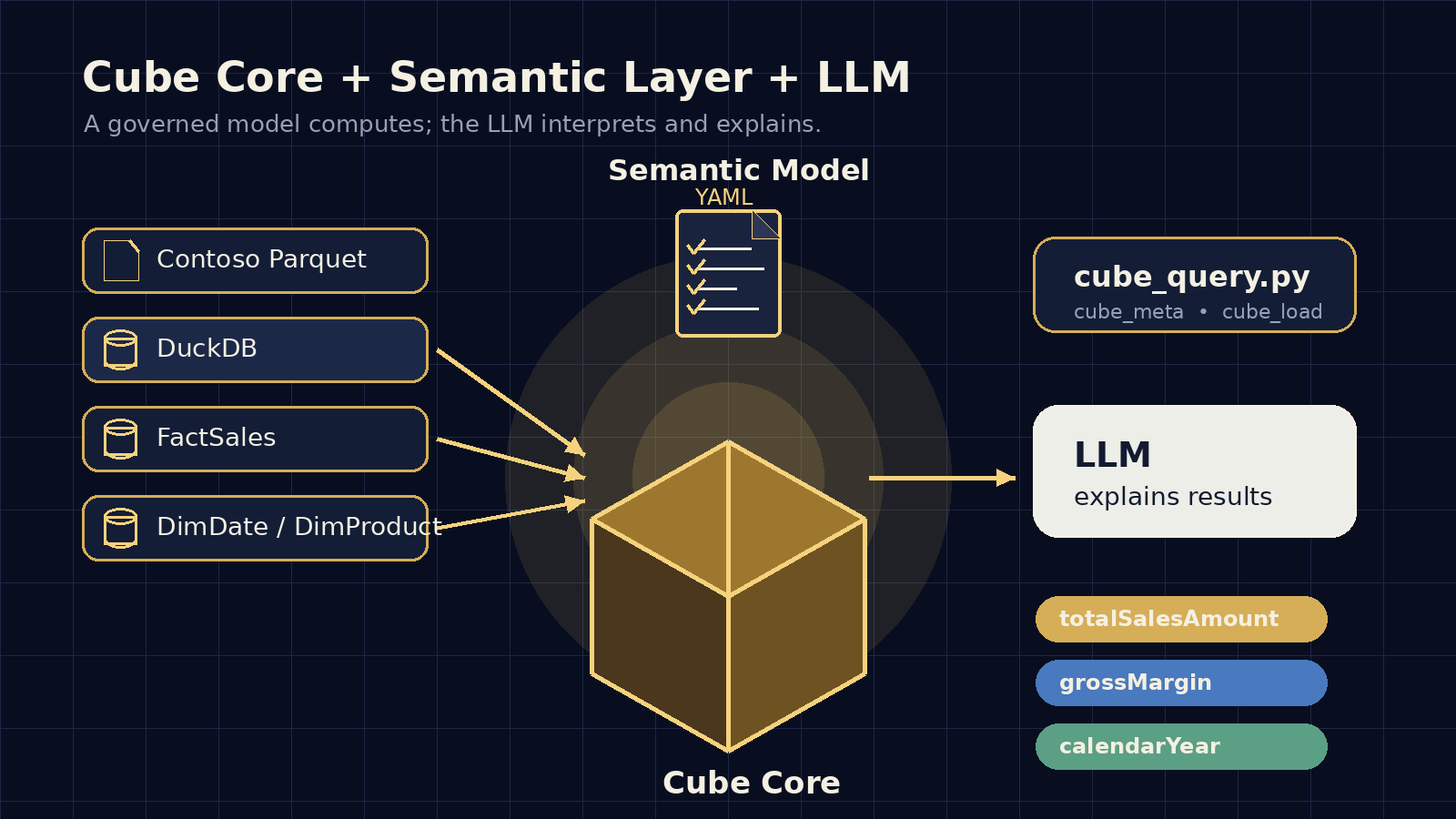
This post is a note for my future self.
After working through a small example with Cube Core, DuckDB, and the Contoso dataset, I finally understood the difference between a semantic layer, a semantic model, a helper, and the actual role of an LLM when we want reliable numerical results.
The central idea is this:
The LLM must not be the source of numerical truth. The LLM interprets and explains. The semantic layer computes.
In this example I used Cube Core because I wanted to understand the architecture of a semantic layer locally, simply, and in a controlled way before taking the idea to larger scenarios like Snowflake, Power BI, or a formal thesis evaluation.
Cube Core is an open-source semantic layer that lets you define business metrics, dimensions, and relationships over a physical data source.
Instead of asking every user, notebook, or LLM to write raw SQL from scratch, Cube exposes a governed model:
Business question -> governed metric -> governed dimension -> joins defined once -> SQL generated by Cube -> consistent resultIn my lab I used this architecture:
flowchart LR
    A[Contoso Parquet files in MinIO] --> B[Local DuckDB]
    B --> C[Cube Core]
    D[Semantic model YAML] --> C
    C --> E[Cube REST API]
    E --> F[Python helper]
    F --> G[Jupyter Notebook]
    G --> H[Didactic explanation / LLM]
The physical source ended up being a local DuckDB database:
/home/hectorsa/cube-core/data/tesis_duckdb_local.dbThe Cube model lives at:
/home/hectorsa/cube-core/conf/model/ContosoDemo.ymlThe notebook project is at:
/home/hectorsa/Documents/Cube_Semantic_Layer_TestThe clearest way I can remember it is this:
semantic layer = infrastructure that serves meaningsemantic model = star schema enriched with business rulesMore concretely:
Semantic layer= Cube Core running as a service+ connection to DuckDB+ query API+ authentication+ metadata endpoint+ query execution
Semantic model= facts+ dimensions+ measures+ joins+ business names+ reusable formulas
In other words:
Cube Core is the platform.The YAML is the model.DuckDB is the data source.The helper is the client.The notebook is the lab.The LLM is the linguistic interface.Without a semantic layer, a seemingly simple question like:
What are the sales and margin by category and year?
forces you to write something like this:
SELECT d.CalendarYear, c.ProductCategoryName, SUM(f.SalesAmount) AS total_sales_amount, SUM(f.TotalCost) AS total_cost, SUM(f.SalesAmount) - SUM(f.TotalCost) AS gross_marginFROM contoso_FactSales fJOIN contoso_DimDate d ON f.DateKey = d.DateKeyJOIN contoso_DimProduct p ON f.ProductKey = p.ProductKeyJOIN contoso_DimProductSubcategory sc ON p.ProductSubcategoryKey = sc.ProductSubcategoryKeyJOIN contoso_DimProductCategory c ON sc.ProductCategoryKey = c.ProductCategoryKeyGROUP BY 1, 2ORDER BY total_sales_amount DESCLIMIT 8;That SQL works, but it has several fragilities:
- You must remember all the joins.
- You must remember the physical column names.
- You must know what
SalesAmountmeans. - You must repeat the gross margin formula every time.
- An LLM can make a mistake anywhere in the join or metric logic.
The semantic layer solves this by moving repeatable logic into a governed model.
The YAML file defines the meaning of the physical tables.
A simplified excerpt from the model looks like this:
cubes:  - name: FactSales    sql_table: main.contoso_FactSales
    measures:      - name: totalSalesAmount        sql: SalesAmount        type: sum        title: Ventas        format: currency
      - name: totalCost        sql: TotalCost        type: sum        title: Costo total        format: currency
      - name: grossMargin        sql: '{totalSalesAmount} - {totalCost}'        type: number        title: Margen bruto        format: currency
      - name: grossMarginPct        sql: '100.0 * ({totalSalesAmount} - {totalCost}) / NULLIF({totalSalesAmount}, 0)'        type: number        title: '% margen bruto'
    dimensions:      - name: salesKey        sql: SalesKey        type: number        primary_key: true
      - name: dateKey        sql: DateKey        type: time
      - name: productKey        sql: ProductKey        type: number
Several important things happen here.
sql_table: main.contoso_FactSalesThis tells Cube:
This cube is based on this physical DuckDB table.Measures are governed metrics.
- name: totalSalesAmount sql: SalesAmount type: sum title: VentasThat means:
When someone asks for FactSales.totalSalesAmount,Cube must compute SUM(SalesAmount).The powerful part is that nobody has to reinvent that metric again.
Gross margin is not written as free SQL in the notebook. It is defined in the model:
- name: grossMargin sql: '{totalSalesAmount} - {totalCost}' type: number title: Margen brutoThis is important for an LLM: the model already knows what gross margin means.
The LLM does not have to deduce it. It only has to ask for the correct metric.
Dimensions are analysis attributes.
For example, date:
- name: DimDate  sql_table: main.contoso_DimDate
  dimensions:    - name: dateKey      sql: DateKey      type: time      primary_key: true
    - name: calendarYear      sql: CalendarYear      type: number
    - name: calendarMonthLabel      sql: CalendarMonthLabel      type: string
And product category:
- name: DimProductCategory  sql_table: main.contoso_DimProductCategory
  dimensions:    - name: productCategoryKey      sql: ProductCategoryKey      type: number      primary_key: true
    - name: productCategoryName      sql: ProductCategoryName      type: string
In simple language:
Measures answer: how much?Dimensions answer: by what attribute do I group or filter?Examples:
How much did we sell? -> measureBy year? -> dimensionBy product category? -> dimensionWhat was the margin? -> measureOne of the most important parts of the YAML is the joins.
In the model, FactSales connects to date and product:
joins:  - name: DimDate    relationship: many_to_one    sql: '{CUBE}.DateKey = {DimDate.dateKey}'
  - name: DimProduct    relationship: many_to_one    sql: '{CUBE}.ProductKey = {DimProduct.productKey}'
And product connects to subcategory:
joins: - name: DimProductSubcategory relationship: many_to_one sql: '{CUBE}.ProductSubcategoryKey = {DimProductSubcategory.productSubcategoryKey}'And subcategory connects to category:
joins: - name: DimProductCategory relationship: many_to_one sql: '{CUBE}.ProductCategoryKey = {DimProductCategory.productCategoryKey}'Visually, the model looks like this:
erDiagram
    FactSales }o--|| DimDate : DateKey
    FactSales }o--|| DimProduct : ProductKey
    DimProduct }o--|| DimProductSubcategory : ProductSubcategoryKey
    DimProductSubcategory }o--|| DimProductCategory : ProductCategoryKey
This was one of the most revealing parts: the YAML does not only define metrics, it also defines the path to reach dimensions.
That is why I can ask for:
FactSales.totalSalesAmount by DimProductCategory.productCategoryNameeven though FactSales does not directly have the category name.
Cube knows how to traverse the graph:
FactSales -> DimProduct -> DimProductSubcategory -> DimProductCategoryWithout Cube, I write physical SQL.
With Cube, I write a semantic query:
{ "measures": ["FactSales.totalSalesAmount", "FactSales.grossMargin"], "dimensions": ["DimProductCategory.productCategoryName", "DimDate.calendarYear"], "order": { "FactSales.totalSalesAmount": "desc" }, "limit": 8}The difference is huge:
I no longer say how to do all the joins.I say which metric I want and by which dimensions I want to see it.Cube generates the correct SQL using the semantic model.
The helper is not the semantic layer.
The helper is just a local utility for calling Cube from Python without repeating HTTP, JWT token, and endpoint code.
In the project it lives here:
/home/hectorsa/Documents/Cube_Semantic_Layer_Test/scripts/cube_query.pyThe minimal idea of the helper is this:
import base64, hashlib, hmac, http.client, json, subprocess, timefrom typing import Any
CONTAINER = "cube-refresh-worker-yhqr23dw24o0ljf83ggecmge"

def _cube_secret() -> str:    # Reads CUBEJS_API_SECRET from the Cube container environment.    # The secret is not hardcoded in the notebook.    prefix = "CUBEJS_API_SECRET="    env_json = subprocess.check_output([        "docker", "inspect", CONTAINER, "--format", "{{json .Config.Env}}"    ], text=True)    for item in json.loads(env_json):        if item.startswith(prefix):            return item.split("=", 1)[1]    raise RuntimeError("Could not find CUBEJS_API_SECRET in the Cube container")

def _cube_host_port() -> tuple[str, int]:    ip = subprocess.check_output([        "docker", "inspect", CONTAINER,        "--format", "{{range .NetworkSettings.Networks}}{{.IPAddress}}{{end}}"    ], text=True).strip()    if not ip:        raise RuntimeError("Could not resolve Docker IP for the Cube container")    return ip, 4000
Then it generates a JWT token to talk to Cube:
def cube_token(ttl_seconds: int = 3600) -> str:    secret = _cube_secret()
    def enc(obj: dict[str, Any]) -> bytes:        return base64.urlsafe_b64encode(            json.dumps(obj, separators=(",", ":")).encode()        ).rstrip(b"=")
    header = enc({"alg": "HS256", "typ": "JWT"})    payload = enc({"iat": int(time.time()), "exp": int(time.time()) + ttl_seconds})    sig = base64.urlsafe_b64encode(        hmac.new(secret.encode(), header + b"." + payload, hashlib.sha256).digest()    ).rstrip(b"=")    return (header + b"." + payload + b"." + sig).decode()
And exposes the two functions I actually use in the notebook:
def cube_load(query: dict[str, Any]) -> dict[str, Any]:    return cube_request("/cubejs-api/v1/load", "POST", {"query": query})

def cube_meta() -> dict[str, Any]:    return cube_request("/cubejs-api/v1/meta")
The analogy:
Cube Core = restaurantSemantic model = menu with official recipesHelper Python = waiter who knows how to ask the kitchenNotebook / LLM = person asking questionsDuckDB = pantry / ingredientsThe waiter does not cook. They only know how to order correctly.
In the notebook I did two things.
First I validated that the data existed:
con.sql("""SELECT (SELECT COUNT(*) FROM contoso_FactSales) AS fact_sales_rows, (SELECT COUNT(*) FROM contoso_DimProduct) AS products, (SELECT COUNT(*) FROM contoso_DimProductCategory) AS categories""").df()Result:
fact_sales_rows: 3,406,089products: 2,233categories: 8Then I ran direct SQL to understand the physical logic:
sql = """SELECT d.CalendarYear, c.ProductCategoryName, SUM(f.SalesAmount) AS total_sales_amount, SUM(f.TotalCost) AS total_cost, SUM(f.SalesAmount) - SUM(f.TotalCost) AS gross_marginFROM contoso_FactSales fJOIN contoso_DimDate d ON f.DateKey = d.DateKeyJOIN contoso_DimProduct p ON f.ProductKey = p.ProductKeyJOIN contoso_DimProductSubcategory sc ON p.ProductSubcategoryKey = sc.ProductSubcategoryKeyJOIN contoso_DimProductCategory c ON sc.ProductCategoryKey = c.ProductCategoryKeyGROUP BY 1, 2ORDER BY total_sales_amount DESCLIMIT 8"""duckdb_sql_result = con.sql(sql).df()duckdb_sql_resultAfter that I made the same query using Cube:
import syssys.path.append(str(Path('../scripts').resolve()))from cube_query import cube_meta, cube_load
meta = cube_meta()
The metadata showed me the available metrics and dimensions:
FactSales measures:- FactSales.count- FactSales.totalSalesAmount- FactSales.totalSalesQuantity- FactSales.totalCost- FactSales.grossMargin- FactSales.grossMarginPct
DimProductCategory dimensions:- DimProductCategory.productCategoryName
DimDate dimensions:- DimDate.calendarYear- DimDate.calendarMonthLabel- DimDate.calendarQuarterLabel
Then the semantic query:
cube_query = {    'measures': ['FactSales.totalSalesAmount', 'FactSales.grossMargin'],    'dimensions': ['DimProductCategory.productCategoryName', 'DimDate.calendarYear'],    'order': {'FactSales.totalSalesAmount': 'desc'},    'limit': 8,}
result = cube_load(cube_query)cube_df = pd.DataFrame(result['data'])cube_df
Cube result:
Home Appliances, 2008 totalSalesAmount = 1426891288.453333 grossMargin = 791977822.0032781Home Appliances, 2007 totalSalesAmount = 1375117996.8142357 grossMargin = 759744791.8541427Home Appliances, 2009 totalSalesAmount = 1120727501.9230988 grossMargin = 627761991.1030741Cameras and camcorders, 2007 totalSalesAmount = 1098555433.3783784 grossMargin = 664774269.2083907Computers, 2009 totalSalesAmount = 938926781.7259947 grossMargin = 537651024.2660043Computers, 2007 totalSalesAmount = 894222614.5380026 grossMargin = 524712835.68800735Cameras and camcorders, 2008 totalSalesAmount = 813888194.612105 grossMargin = 490078318.9321116Computers, 2008 totalSalesAmount = 788289774.7310024 grossMargin = 459459357.281The important thing is not only that the results match. The important thing is that the second approach no longer depends on the user remembering the physical SQL.
This is how the pieces connect:
flowchart TD
    A[Physical data: Contoso in DuckDB] --> B[Tables: FactSales, DimDate, DimProduct]
    B --> C[Cube YAML semantic model]
    C --> C1[Measures: totalSalesAmount, grossMargin]
    C --> C2[Dimensions: calendarYear, productCategoryName]
    C --> C3[Joins: FactSales -> Product -> Category]
    C1 --> D[Cube Core]
    C2 --> D
    C3 --> D
    D --> E[Cube REST API]
    E --> F[Python helper: cube_meta, cube_load]
    F --> G[Jupyter Notebook]
    G --> H[LLM explains the result]
Another way to see it:
sequenceDiagram
    participant U as User
    participant L as LLM
    participant S as Skill / Guide
    participant H as Python helper
    participant C as Cube Core
    participant Y as YAML semantic model
    participant D as DuckDB

    U->>L: How much sales and margin by category and year?
    L->>S: How should I query Contoso?
    S-->>L: Use cube_meta and cube_load. Do not invent numbers.
    L->>H: cube_load(semantic query)
    H->>C: POST /cubejs-api/v1/load
    C->>Y: Reads measures, dimensions, and joins
    C->>D: Generates and executes SQL
    D-->>C: Numerical result
    C-->>H: JSON with data
    H-->>L: DataFrame / dict
    L-->>U: Explanation in natural language
Here it helped me to separate the concepts very clearly:
Semantic model / layer= business rules + metrics + dimensions + joins + deterministic computation
Helper= technical client for querying Cube without repeating HTTP/JWT/query boilerplate
Skill= operational guide so the LLM knows how to use the helper and does not invent numbers
LLM= interprets the question, calls the correct tool, and explains the result
The skill is not the semantic model.
The skill only tells the LLM how to behave.
For example, a skill for this lab should say something like:
# Contoso Cube Semantic Layer
## When to use
Use when the question involves sales, margin, costs, units, dates,products, categories, or subcategories from the Contoso dataset.
## Main rule
Numerical results must come from Cube Core via `cube_load`.Do not compute metrics manually unless the user explicitly asks for validation.
## Helper available
Path:`/home/hectorsa/Documents/Cube_Semantic_Layer_Test/scripts/cube_query.py`
Functions:
- `cube_meta()` to inspect available metrics and dimensions.- `cube_load(query)` to execute a semantic query against Cube.
## Mandatory flow
1. Consult metadata if metrics/dimensions are unknown.2. Build a Cube JSON query.3. Execute `cube_load(query)`.4. Review the returned result.5. Explain the result in natural language.6. Do not invent values if Cube does not return them.
That disciplines the LLM.
Without a skill, the LLM might improvise SQL, assume columns, or invent a metric.
With a skill, the LLM knows it must use Cube.
It does not mean the LLM becomes deterministic in everything.
It means the numbers do not come from the LLM’s probabilistic reasoning.
They come from a controlled path:
Governed metric -> Semantic query -> Cube -> DuckDB -> ResultThe LLM may vary in explanation, but it must not vary in computation.
This phrase summarizes the point:
The LLM does not act as an analytics engine nor as a source of numerical truth; it acts as a linguistic interface over a deterministic semantic layer.
For my thesis project, the idea is to prove that an LLM can reduce numerical errors when using a semantic layer/model instead of improvising.
The experimental design can be compared like this:
flowchart LR
    Q[Analytical question] --> A[LLM with no tools]
    Q --> B[LLM with free SQL]
    Q --> C[LLM with Cube semantic layer]

    A --> A1[Probable but unverifiable answer]
    B --> B1[May be correct, but may fail joins/rules]
    C --> C1[Result governed by model metrics]
Three useful scenarios:
A. LLM without tools   Responds from reasoning or general knowledge.   High risk of numerical hallucination.
B. LLM with raw data access   Can generate SQL or pandas directly.   May be correct, but depends on understanding columns, joins, and rules.
C. LLM with skill + Cube semantic model Uses governed metrics and dimensions. Should produce higher accuracy and consistency.Before, I mentally mixed these pieces:
semantic layersemantic modelYAMLhelperLLM toolnotebookNow I see them separated:
DuckDB= physical base
Cube Core= semantic layer
ContosoDemo.yml= semantic model
cube_query.py= technical helper
Jupyter Notebook= didactic laboratory
Skill= instructions so the LLM uses the helper correctly
LLM= translator between natural language and semantic query
And the final flow is:
User asks in natural language ↓LLM interprets intent ↓Skill reminds the LLM how to use the helper ↓Helper queries Cube Core ↓Cube applies the semantic model ↓DuckDB/Contoso delivers data ↓Cube returns governed result ↓LLM explains the resultThis small example with Contoso helped me because it does not try to solve the whole thesis at once.
It only shows the minimal puzzle:
1. Reduced Contoso dataset2. DuckDB as local base3. Cube Core as semantic layer4. YAML as semantic model5. Python helper as programmatic interface6. Notebook as didactic demonstration7. Skill as guide for the LLMThe most important idea I want to remember is:
Cube computes. The model governs. The helper queries. The skill guides. The LLM explains.
If I keep that separation, the thesis architecture becomes much clearer.