Helical Insight v7.0 on a Mac mini: why it caught my attention and how I deployed it with Coolify
A hands-on, independent look at deploying Helical Insight v7.0 with Docker Compose and Coolify on a private Mac mini.
Editorial disclosure. This is the first post in a series based on my hands-on, independent evaluation of Helical Insight. The project’s founder contacted me after I discovered it, but this article is neither sponsored nor subject to editorial approval. Product claims are attributed to their official sources; the installation results reflect my test environment.
For several years, I have worked with Power BI, Microsoft Fabric, and Tableau. They are powerful tools, but I have also seen how per-user licensing, capacity, embedding, and cloud operations can complicate an analytics project for a small or midsize business. Added to that reality is a question that occupies much of my current research: how do you give language models enough business context to answer reliably about a database?
That is why, when I discovered Helical Insight, I did not see it merely as another dashboard product. What made me pause was the combination of four elements that usually appear separately: enterprise paginated reporting, interactive dashboards, a Semantic Model module, and conversational analytics with the option to use the LLM of the user’s choice. The project presents itself as a unified, open, self-hosting-ready BI platform; its public repository includes the backend, frontend, Docker assets, documentation, and Instant BI components.[1][3]
I also found the commercial proposition unusual. Helical states that the Community Edition includes the same capabilities as Enterprise—including Instant BI, dashboards, pixel-perfect reports, embedding, SSO, multi-tenancy, and row-level security—and that the stated differences are limited to commercial support and mandatory branding in charts and exports.[2] That claim deserves careful verification, but it is exactly the type of model worth evaluating when control over data, deployment, and licensing cost matters.
Shortly after I began exploring the tool, the founder of Helical Insight contacted me to ask whether I would write about my experience. The timing was fortunate: I had already planned to test it independently, especially its Semantic Model and the possibility of combining self-hosted BI with AI-assisted analytics. This first article documents the step that made that evaluation possible: the actual deployment of Helical Insight v7.0 on a Mac mini using Docker Compose and Coolify.
This is not a final product review. It is a technical log of an installation that involved real failures, adjustments, and verification; that is also why I am keeping it as a guide for my future self.
Helical Insight brings together components that often require several tools:
- Interactive dashboards with filters, drill-down, and drill-through.
- Paginated/pixel-perfect reports, useful for operational documents such as invoices, financial statements, or printable reports.
- Embedding and APIs, relevant when analytics must live inside another application.
- Security and multi-tenancy, including SSO and row-level security according to the product’s public matrix.[1][2]
- Instant BI, its conversational analytics component, with a stated bring your own LLM option.[2][3]
- Semantic Model, the aspect I am most interested in testing: measures, dimensions, definitions, and business context that could help a conversational layer generate better queries.
None of this proves on its own that it is the right solution for every organization. Vendor-stated capabilities and the operational experience are different things. But having the code available and a Docker path made it possible to move quickly from curiosity to a private test environment.[3]
I did not need to publish a BI portal to the internet. I wanted a private, reproducible environment for experimenting first with synthetic data and later with a controlled Contoso workload held in Oracle. The goal was to test Metadata, the Semantic Model, reports, and Instant BI without exposing business databases or AI provider keys.
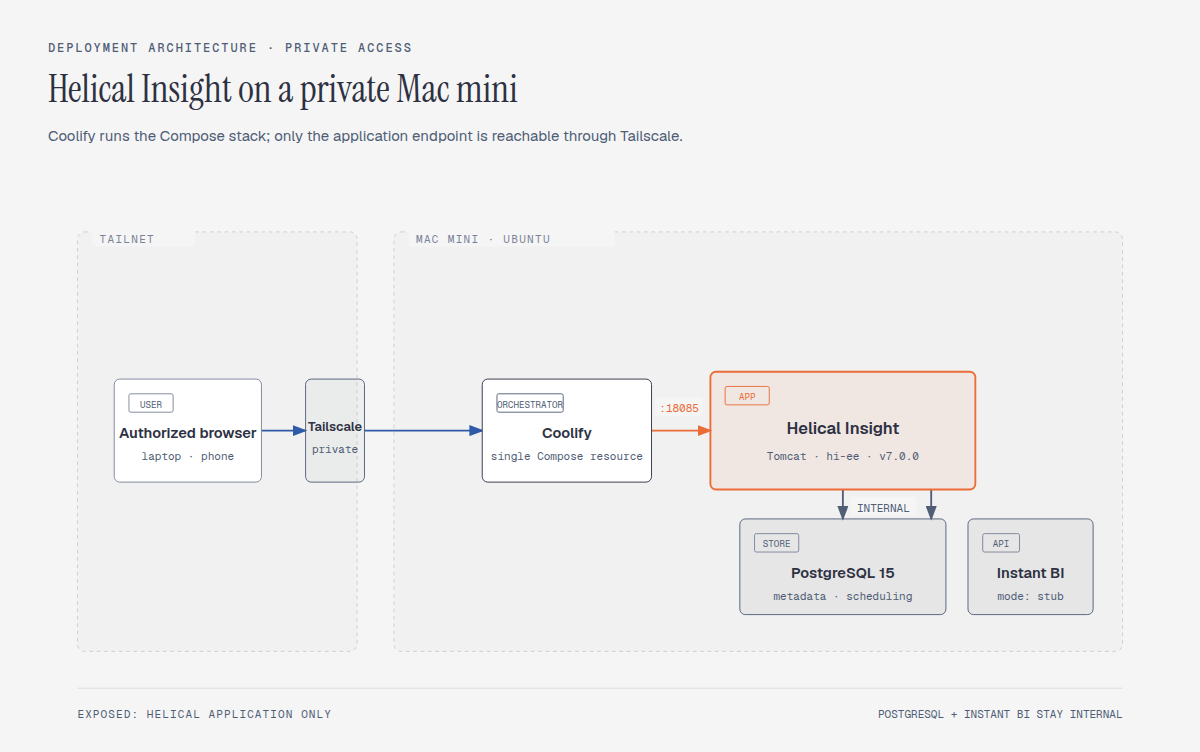
Coolify manages the Docker Compose lifecycle, but access to the application does not go through a public domain or Traefik. The application is published only on a Tailscale address and a private port. PostgreSQL and Instant BI remain inside the Docker network.
One distinction matters for the rest of this series: PostgreSQL is Helical’s internal application database. It stores metadata, repository state, and scheduling information. The Contoso business data stays in Oracle Autonomous AI Database, which Helical reaches later through a separate read-only JDBC mTLS Data Source. Oracle is not another container in this stack, and PostgreSQL is not a copy of Contoso.
| Component | Configuration |
|---|---|
| Host | Mac mini running Ubuntu 24.04 |
| CPU / RAM | 4 cores / 16 GiB RAM |
| Orchestration | Coolify with a single Docker Compose stack |
| Platform | Helical Insight Community Edition v7.0.0 |
| Business data source | Oracle Autonomous AI Database through read-only JDBC mTLS |
| Internal application database | PostgreSQL 15 for Helical metadata, repository, and scheduling |
| Conversational AI | Instant BI, initially in stub mode |
| Access | Tailscale, without exposing PostgreSQL or Instant BI |
| Persistence | Dedicated bind mounts on the host |
The stub mode was deliberate. Before sending a single row to an external LLM, I wanted to verify that the platform, data flow, and internal components started correctly. Configuring a real AI provider will be a later test, using synthetic data and a key stored as a Coolify secret.
Helical’s official guide provides installation resources, and the repository includes a Docker path.[3] However, deploying it within Coolify while keeping data secure required additional decisions. This is the procedure that worked for me.
Before copying a Compose file, verify the host and Docker prerequisites:
PRIVATE_HOST=private-hostname
ssh "$PRIVATE_HOST" '  DATA_MOUNT=/srv/helicalinsight  uname -m  df -hT / "$DATA_MOUNT"  findmnt -T "$DATA_MOUNT"  docker version  docker compose version'
For this deployment, the host was x86_64 and had sufficient space for images, the official package, and persistent storage. Do not assume an ARM machine has exactly the same compatibility; checking the architecture first prevents wasting time on a deployment that cannot start.
Rather than relying on ephemeral volumes managed by the resource, the host inventory now includes the following dedicated directory tree. For a fresh deployment, I would create the service-data paths with root ownership and 0750, while applying stricter permissions to the wallet and secret directory because they contain credentials or mTLS material:
DATA_ROOT=/srv/helicalinsight
sudo install -d -o root -g root -m 0750 \  "$DATA_ROOT/postgres" \  "$DATA_ROOT/hi/db" \  "$DATA_ROOT/hi/hi-repository" \  "$DATA_ROOT/config" \  "$DATA_ROOT/instantbi" \  "$DATA_ROOT/hirepo-root" \  "$DATA_ROOT/tomcat-temp" \  "$DATA_ROOT/logs" \  "$DATA_ROOT/.bootstrap" \  "$DATA_ROOT/oracle-jdbc"
# These are host-only credential locations. Do not commit or publish either.# Only the Oracle wallet is mounted, read-only, by hiee.sudo install -d -o root -g root -m 0700 \  "$DATA_ROOT/oracle-wallet" \  "$DATA_ROOT/.secrets"
sudo find "$DATA_ROOT/oracle-wallet" -type f -exec chmod 0600 {} \;sudo find "$DATA_ROOT/.secrets" -type f -exec chmod 0600 {} \;
PostgreSQL metadata, the Helical repository, extracted configuration, Instant BI, logs, the bootstrap marker, and the Oracle JDBC JAR cache survive a normal redeploy. oracle-wallet contains mTLS connection material and .secrets holds local secret files; neither belongs in Git or in a screenshot. The wallet material is never a Coolify variable. In the sanitized example, ORACLE_WALLET_DIR represents only the private host directory used for the read-only bind mount. A required runtime password belongs in a Coolify secret field, not an ordinary visible variable. I would not use chmod 777; if a container fails because of permissions, I would first inspect its UID/GID and logs.
The Compose file I used includes a one-time bootstrap service. On its first startup, it downloads the official Docker package for version v7.0.0, extracts the necessary files, and leaves a completion marker in the persistent directory.
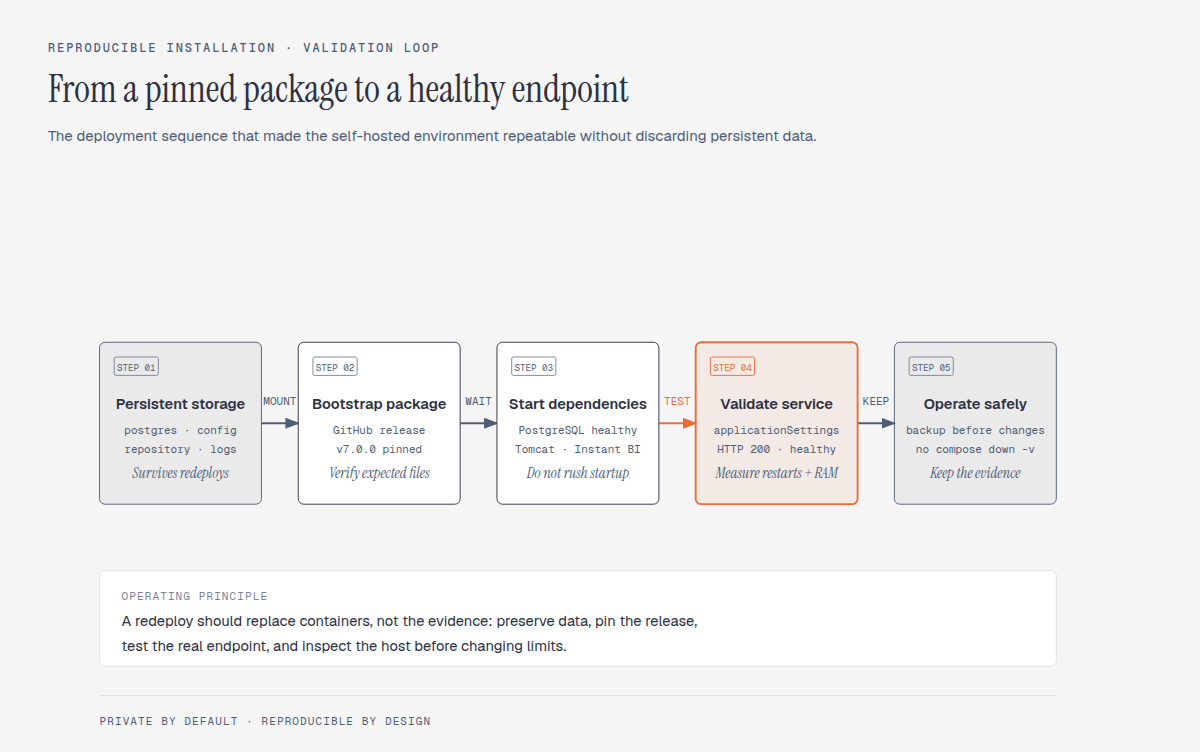
Pinning the version prevents a redeploy from changing the software implicitly. It also makes it possible to distinguish between an infrastructure problem and a change introduced by an update.
For future reuse, I keep a sanitized docker-compose.example.yml and its companion env.example. They are a version-pinned operational baseline, not a place to copy secrets: the downloadable files retain health checks, resource limits, Oracle runtime preparation, and all required bind mounts, while replacing host-specific paths, wallet locations, passwords, and private routes with explicit placeholders.
The final stack has five services:
bootstrapdownloads and prepares the official Helical package artifacts once.oracle-jdbc-bootstrapdownloads the five JDBC mTLS/FAN JARs into a persistent host directory.postgresstores Helical metadata and scheduling data; it is not a copy of the business dataset.hieeruns Helical Insight on Tomcat.instantbiruns the Python service behind the conversational layer.
The most important update is that hiee waits for both preparation jobs and for PostgreSQL health before it starts. The complete downloadable file also copies the Oracle JARs into Tomcat at runtime without mounting over Tomcat’s own library directory, and mounts the wallet read-only only for the Helical container.
services:  bootstrap:    image: alpine:3.20    restart: 'no'    volumes:      - ${DATA_ROOT:?set_DATA_ROOT}/hi:/data/hi      - ${DATA_ROOT:?set_DATA_ROOT}/config:/data/config      - ${DATA_ROOT:?set_DATA_ROOT}/instantbi:/data/instantbi      - ${DATA_ROOT:?set_DATA_ROOT}/.bootstrap:/data/bootstrap
  oracle-jdbc-bootstrap:    image: alpine:3.20    restart: 'no'    volumes:      - ${DATA_ROOT:?set_DATA_ROOT}/oracle-jdbc:/data/oracle-jdbc
  postgres:    image: postgres:15.8-alpine3.20    restart: unless-stopped    environment:      POSTGRES_USER: hiuser      POSTGRES_PASSWORD: ${POSTGRES_PASSWORD}      POSTGRES_DB: hiee    healthcheck:      test: ['CMD-SHELL', 'pg_isready -U $${POSTGRES_USER} -d $${POSTGRES_DB}']    volumes:      - ${DATA_ROOT:?set_DATA_ROOT}/postgres:/var/lib/postgresql/data
  hiee:    image: hiee/helicalinsight:nitrogen-j25t11    depends_on:      bootstrap:        condition: service_completed_successfully      oracle-jdbc-bootstrap:        condition: service_completed_successfully      postgres:        condition: service_healthy    healthcheck:      test: ['CMD-SHELL', 'curl -f http://localhost:8080/hi-ee/applicationSettings || exit 1']    volumes:      - ${DATA_ROOT:?set_DATA_ROOT}/oracle-jdbc:/host-oracle-jdbc:ro      - ${ORACLE_WALLET_DIR:?set_ORACLE_WALLET_DIR}:/opt/oracle/wallet:ro    ports:      - '${TAILSCALE_IP}:${HELICAL_HOST_PORT}:8080'
  instantbi:    image: python:3.13-slim    expose: ['8000']
The PostgreSQL detail is not optional. In this exact v7.0.0 package, the WAR embeds the hiuser / hiee datasource contract. On a fresh PostgreSQL volume, POSTGRES_PASSWORD must be the private value compatible with that packaged datasource; substituting an arbitrary secret caused password authentication failed at application startup. The value does not belong in the post, the downloadable example, version control, or Coolify’s non-secret fields.
The minimum variables I keep separate are:
DATA_ROOT=/srv/helicalinsightPOSTGRES_USER=hiuserPOSTGRES_PASSWORD=REPLACE_WITH_PRIVATE_PACKAGE_COMPATIBLE_VALUEPOSTGRES_DB=hieeHOST_IP=private-hostname:18085# Reserved documentation address. Replace with your private Tailscale address.TAILSCALE_IP=192.0.2.10HELICAL_HOST_PORT=18085ORACLE_WALLET_DIR=/private/path/to/oracle-walletHELICALBI_LLM_MODE=stubINSTALL_CHROME=falseIn Coolify, I selected a Docker Compose resource and pasted in a single Compose file. Then:
- I added the environment variables in Coolify.
- I marked the PostgreSQL password as a secret.
- I did not assign a public domain or additional ports.
- I did not publish the PostgreSQL or Instant BI ports.
- I performed the first deployment and waited for
bootstrapto complete before interpreting Tomcat’s status.
The first startup is not immediate. Bootstrap downloads a large package, PostgreSQL initializes its data, Tomcat deploys the WAR, and Instant BI installs Python dependencies. A temporary starting status does not automatically mean failure.
The most useful endpoint I found for Helical was:
/hi-ee/applicationSettingsThe application health check was conceptually as follows:
healthcheck: test: ['CMD-SHELL', 'curl -f http://localhost:8080/hi-ee/applicationSettings || exit 1'] interval: 30s timeout: 10s retries: 8 start_period: 90sI did not use the login page as a health check because it can respond with a redirect and does not clearly distinguish between a routed interface and a healthy backend.
A healthy deployment should not compete without limits against the rest of the host’s services. On my Mac mini, I set these conservative limits:
| Service | RAM Limit | Reservation |
|---|---|---|
| Helical/Tomcat | 1.5 GiB | 768 MiB |
| Instant BI | 512 MiB | 256 MiB |
| PostgreSQL | 384 MiB | 192 MiB |
I also limited the Java heap:
CATALINA_OPTS=-Xms256m -Xmx768mThere is no universal number: limits should grow only after measuring usage, OOMs, restarts, and actual report load. In the validation snapshot captured on August 24, 2026, Helical was using about 929 MiB of its 1.5 GiB limit, while PostgreSQL and Instant BI were well below their caps.
The useful part of a guide is not pretending that everything started successfully on the first try. These were the relevant setbacks.
The first version of the bootstrap process used a find option that works in GNU find but not in BusyBox/Alpine. The container exited with an error before copying the package.
Fix: use BusyBox-compatible constructs and test the command inside the image that actually runs bootstrap, not just on the Ubuntu host.
Another error came from trying to run rm -rf /data/hi on a mount point. Docker reported it as busy.
Fix: retain the directory that functions as the mount point and delete only its contents:
for dir in /data/hi /data/config /data/instantbi; do find "$dir" -mindepth 1 -maxdepth 1 -exec rm -rf {} +doneRun this only inside the bootstrap container, where those paths are controlled bind mounts—not arbitrary host paths. That makes it possible to rebuild bootstrap artifacts without destroying the persistent mount points.
The initial extraction could not assume that the ZIP root was the root of the desired package. Instant BI also included artifacts that could confuse a naive detection process.
Fix: explicitly locate hi/hi-ee.war and derive the package root from that file; then verify that the entrypoint and Instant BI application are also present.
Coolify showed a resource as stopped, but an older container was still holding the private port. The new hiee could not start.
Fix: identify the actual port owner with Docker, stop the obsolete deployment, preserve the persistent bind mounts and volumes, and start the new deployment again. I did not use docker compose down -v.
A later redeploy exposed a failure mode that was easy to misread: the web container was running, but the Helical application could not authenticate to its internal PostgreSQL store. The password held by the initialized database volume no longer matched the connection contract used by the packaged application.
Fix: preserve the PostgreSQL volume, identify the effective application-to-database configuration, and align the internal role through a controlled secret-handling procedure before restarting only the affected service. Do not treat a Compose variable change as sufficient proof that an already-initialized database and packaged application agree.
Preventive practice: treat initial PostgreSQL credentials, the initialized volume, and the application connection configuration as one contract. After any credential or redeploy change, verify /hi-ee/applicationSettings; a running Tomcat process is not sufficient evidence of a healthy Helical installation.
The v7.0.0 package referenced an older namespace for ChatOllama. The current Python image required the langchain-ollama package.
Fix: explicitly patch the import during preparation and ensure that langchain-ollama is in requirements.txt. This is a deployment adaptation, not a claim about every future Helical version; that is why I would document it alongside the exact version.
After the redeploy, I did not stop at Coolify showing a green icon. I verified four levels:
# Containers and statussudo docker ps -a --format 'table {{.Names}}\t{{.Status}}\t{{.Ports}}'
# Health check and restart statussudo docker inspect <hiee-container> \  --format 'health={{.State.Health.Status}} restarts={{.RestartCount}}'
# Application endpoint over the private routePRIVATE_HOST=private-hostnamePRIVATE_PORT=18085curl -fsS "http://${PRIVATE_HOST}:${PRIVATE_PORT}/hi-ee/applicationSettings"
# Actual resource usagesudo docker stats --no-stream
The validation snapshot captured on August 24, 2026 produced:
hiee       healthy, 0 restartspostgres   healthyinstantbi  healthy
http://<private-host>:<private-port>/hi-ee/applicationSettings → HTTP 200
I was also able to access the interface from an iPhone through Tailscale. That detail matters: a healthy container does not by itself guarantee that a user can reach the product from the intended network.
These precautions prevented me from turning a configuration failure into data loss:
- Do not run
docker compose down -vduring the evaluation. - Do not delete Helical’s persistent directory to “fix” a redeploy.
- Do not rotate the PostgreSQL password without verifying the effective internal configuration of the WAR and the existing volume.
- Do not copy API keys, passwords, private URLs, or connection strings into public Compose files, Git, or Slack.
- Do not enable an LLM with real data before reviewing costs, data retention, region, and security controls.
- Do not publish PostgreSQL or Instant BI merely for debugging convenience.
Before experimenting with Semantic Models or upgrading versions, I would take at least one backup of the persistent data:
DATA_ROOT=/srv/helicalinsightsudo tar -C "$(dirname "$DATA_ROOT")" \ -czf "${DATA_ROOT}-backup-$(date +%F).tar.gz" \ "$(basename "$DATA_ROOT")"In addition to the archive, a logical PostgreSQL dump is preferable once the system is stable. And that backup needs to end up off the same disk if it is truly intended to protect against a host failure.
After the base platform was healthy, I connected Helical to Oracle Autonomous AI Database for a controlled Contoso Retail test. This did not move benchmark tables into PostgreSQL. PostgreSQL remained Helical’s internal metadata and scheduling store.
The extension required Oracle JDBC runtime files, a wallet mounted read-only into the container, and a dedicated database account with explicit SELECT grants. The wallet, its directory, and the account secret are kept outside Git, public Compose examples, and screenshots. A direct read test succeeded and a write attempt was denied.
This is deliberately an extension, not a hidden prerequisite of the base deployment. A sanitized Coolify Compose example can describe bind mounts and health checks, but each operator must supply their own private wallet and database-specific connection material. The follow-up article documents the Data Source, Metadata, report, and validation path without exposing private routes or credentials.
In the post-deployment validation recorded on 2026-08-30, the installation was active and validated for the infrastructure flow:
Docker Compose → Coolify → PostgreSQL → Helical Insight → Instant BIThe application endpoint returns HTTP 200, and the three services remain healthy. A later Contoso Retail control also validated the next, separate path: Oracle Autonomous AI Database → read-only JDBC mTLS Data Source → Metadata → ranked report → private dashboard. The control returned 15 expected rows—five top brands for each of 2007, 2008, and 2009—and matched an independent Oracle gold ledger.
I am not yet claiming that Instant BI produces reliable answers with a real LLM, nor that the Semantic Model alone solves business-semantics problems. That requires a separate, reproducible test with clear comparison criteria. But the platform is now validated beyond startup: it can query an external database through a least-privilege connection, preserve an explicit reporting model, and render a result that has been independently checked.
Helical Insight caught my attention because it challenges an assumption that has become common in BI: that advanced features must necessarily sit behind an enterprise plan or an increasingly expensive cloud platform. Its public proposition is that the Community platform retains the capabilities and that the commercial model focuses on support and branding.[2]
My experience so far shows that self-hosting is possible, but not magical. It required understanding Docker, persistence, private networking, resource limits, logs, and runtime dependencies. In return, the environment is under my control: I can work with synthetic data, inspect the SQL, control the network, and decide when—or whether—to connect an external AI layer.
That balance between autonomy and responsibility is, to me, the most interesting part of the platform.
[1] https://helicalinsight.com [2] https://www.helicalinsight.com/community-edition [3] https://github.com/helicalinsight/helicalinsight