Modal for Data Science: Free GPU Compute for Your Python Projects
Learn how to use Modal — a serverless GPU platform with $30/month free credits — to run data science and machine learning workloads from your local Jupyter notebooks and Python scripts. Covers setup with uv, notebook integration, GPU selection, and common pitfalls.

If you’ve ever waited 45 minutes for scikit-learn to finish a grid search on your laptop, you know the pain. The M2 MacBook Air is great for browsing, but when your master’s assignment involves training a neural network on 50,000 rows, you start fantasizing about GPUs you don’t own.
Enter Modal: a serverless GPU cloud that gives you $30/month in free credits — no credit card, no commitment — and lets you run Python functions on NVIDIA GPUs with a single decorator.
Modal is a serverless compute platform built for AI workloads. Instead of renting a VM, installing CUDA drivers, and configuring Docker, you add a @app.function(gpu="L40S") decorator above your Python function. Modal handles everything else: containerization, GPU scheduling, auto-scaling, and teardown.
Think of it as “cloud functions, but with GPUs.”
import modal
app = modal.App("my-project")
@app.function(gpu="T4")def train_model():    import torch    # Your heavy ML code here — runs on a real GPU    return {"accuracy": 0.94}
@app.local_entrypoint()def main(): result = train_model.remote() print(result)Modal’s Starter plan gives you $30 of compute credits every month. Here’s what that buys you:
| GPU | VRAM | Cost per hour | Hours of free compute/month |
|---|---|---|---|
| T4 | 16 GB | $0.59 | ~50 hours |
| L4 | 24 GB | $0.80 | ~37 hours |
| L40S | 48 GB | $1.95 | ~15 hours |
| A100 (40GB) | 40 GB | $2.10 | ~14 hours |
| A100 (80GB) | 80 GB | $2.50 | ~12 hours |
| H100 | 80 GB | $3.95 | ~7 hours |
For graduate students, there’s also the Modal for Academics program offering up to $10,000 in additional credits. Apply at modal.com/academics.
I use uv for Python projects. Here’s the complete setup:
# Create a new projectuv init modal-ds --no-readmecd modal-ds
# Pin Python 3.12 (Modal doesn't support 3.13 yet)uv python pin 3.12
# Install Modal + data science dependenciesuv add modal jupyter pandas scikit-learn torch matplotlib
# Edit pyproject.toml: change "requires-python" to ">=3.12"# (uv init defaults to >=3.13)
# Authenticate with Modal (opens browser)uv run modal setup
⚠️ Important: Modal currently supports Python 3.10–3.12 only. If your system has Python 3.13, you must pin 3.12 or you’ll get
InvalidError: Unsupported Python version: '3.13'.
Modal gives you four ways to define your container environment, all chainable with build methods like .pip_install(), .apt_install(), and .run_commands().
| Builder | When to use it | Example |
|---|---|---|
.debian_slim() | The default — covers 95% of data science needs. | modal.Image.debian_slim(python_version="3.12").pip_install("torch") |
.from_registry() | Pull a pre-built image from Docker Hub, NVIDIA NGC, or any public registry. | modal.Image.from_registry("nvidia/cuda:12.1.0-devel-ubuntu22.04", add_python="3.12") |
.from_dockerfile() | You already have a Dockerfile. | modal.Image.from_dockerfile("./Dockerfile") |
.micromamba() | You need conda/mamba packages (e.g., bioinformatics tools from conda-forge). | modal.Image.micromamba().conda_install("bioconda::samtools") |
.from_name() | Reuse an image you previously built and published. | modal.Image.from_name("my-ml-image:v1") |
All of these support the same chainable build methods:
image = ( modal.Image.debian_slim(python_version="3.12") .apt_install("git", "ffmpeg") # system packages .pip_install("torch", "transformers") # Python packages .run_commands("echo 'build complete!'") # arbitrary shell commands .env({"HF_HOME": "/cache"}) # environment variables)For data science coursework, .debian_slim() with .pip_install() is all you need. Switch to .from_registry() when you need a specific CUDA version, or .micromamba() when a package only exists on conda-forge.
Best for: batch jobs, scheduled tasks, one-off experiments.
import modal
image = modal.Image.debian_slim(python_version="3.12").pip_install(    "torch", "scikit-learn", "pandas")app = modal.App("train-model", image=image)
@app.function(gpu="L40S")def train():    from sklearn.ensemble import RandomForestClassifier    # ... training code ...    return {"score": 0.92}
@app.local_entrypoint()def main():    result = train.remote()    print(result)
Run it:
uv run modal run train.pyThe first run takes ~60–90 seconds while Modal builds the container image. Subsequent runs are much faster — the image stays cached.
⚠️ Never use
python train.py— Modal decorators only activate throughmodal run. Running with plain Python produces no output.
Best for: exploratory data analysis, iterative model development, course assignments.
The pattern is simple: your notebook runs locally on your laptop, but heavy GPU calls go to Modal via .remote(). Data exploration, pandas, and matplotlib stay local (free). Only GPU bursts hit the cloud.
# Cell 1: Setupimport modal
image = modal.Image.debian_slim(python_version="3.12").pip_install(    "torch", "scikit-learn", "pandas")app = modal.App("nb-hybrid", image=image)
# Cell 2: Define GPU functions@app.function(gpu="L40S")def train_model(X_train, y_train, X_test, y_test):    import torch    import torch.nn as nn
    device = torch.device("cuda")    # ... model training on GPU ...    return {"accuracy": 0.94, "history": [...]}
# Cell 3: Run locally (CPU — free)import pandas as pddf = pd.read_csv("dataset.csv")print(f"Loaded {len(df):,} rows")
# Cell 4: Offload to GPU (Modal cloud)with app.run():                    # ← CRITICAL: context manager required    result = train_model.remote(        X_train, y_train, X_test, y_test    )
# Cell 5: Analyze locally (CPU)import matplotlib.pyplot as pltplt.plot([h["accuracy"] for h in result["history"]])plt.show()
⚠️ The
with app.run():context manager is mandatory in notebooks. Without it, you’ll getFunction has not been hydrated.
| Your workload | Recommended GPU | Why |
|---|---|---|
| Prototyping, small models (< 1M params) | T4 ($0.59/hr) | Cheapest, 16 GB VRAM |
| Inference, medium models (1M–7B params) | L40S ($1.95/hr) | Best cost/performance, 48 GB |
| Fine-tuning, large models (7B–70B) | A100-80GB ($2.50/hr) | 80 GB VRAM, fast training |
| Heavy training, largest models | H100 ($3.95/hr) | Fastest available, FP8 support |
For most data science coursework (scikit-learn, XGBoost, small neural nets), a T4 or L40S is more than enough.
Modal charges per second of active compute, not for idle time:
- GPU billed: Only while your function is executing.
- CPU/RAM billed: Same — per second, only during execution.
- Storage (Volumes): $0.09/GiB/month, but the first 1 TiB is free.
- Idle: $0. Scale-to-zero is the default.
A typical data science notebook that trains a model for 5 seconds on a T4 costs about $0.0008. With $30/month, you can run that ~37,000 times.
💡 Always use the default preemptible tier. The 3× non-preemptible multiplier is for production APIs that can’t tolerate interruptions — your batch jobs and notebooks don’t need it.
Not every workload needs a GPU. I ran the exact same neural network on my local CPU and on a Modal T4 to see when the cloud GPU actually pays off.
| Metric | CPU (local) | GPU (Modal T4) |
|---|---|---|
| Time | 0.7s | 4.4s |
| Cost | $0 | ~$0.0007 |
Winner: CPU. The T4’s cold start (~3 seconds) dominates the tiny compute time. For a model this small, your laptop is faster.
| Metric | CPU (local) | GPU (Modal T4, estimated) |
|---|---|---|
| Time | 70s | ~7–14s |
| Cost | $0 | ~$0.002 |
Winner: GPU by 5-10x. Once your model has more layers and your dataset hits six figures, the GPU pulls ahead decisively.
If training takes < 5 seconds on CPU → don't bother with GPUIf training takes 5–30 seconds on CPU → GPU helps, but CPU is fineIf training takes > 30 seconds on CPU → GPU is a no-brainerFor most coursework assignments, your laptop handles the prototyping fine. Modal earns its keep when you scale up — hyperparameter sweeps, cross-validation on large datasets, or fine-tuning pre-trained models.
| Pitfall | Error message | Fix |
|---|---|---|
| Python 3.13 in venv | Unsupported Python version: '3.13' | uv python pin 3.12 && uv sync |
| Python 3.13 in venv vs 3.12 image | defined with Python 3.13, but its Image has 3.12 | Same — pin to 3.12 and recreate venv |
Running python script.py | No output at all | Use modal run script.py |
.remote() without with app.run(): | Function has not been hydrated | Wrap in with app.run(): |
make_classification ValueError | n_classes * n_clusters_per_class <= 2**n_informative | Set n_informative, n_redundant explicitly |
| Container idle billing (Jupyter in cloud) | Costs keep climbing | Ctrl+C modal launch jupyter when done |
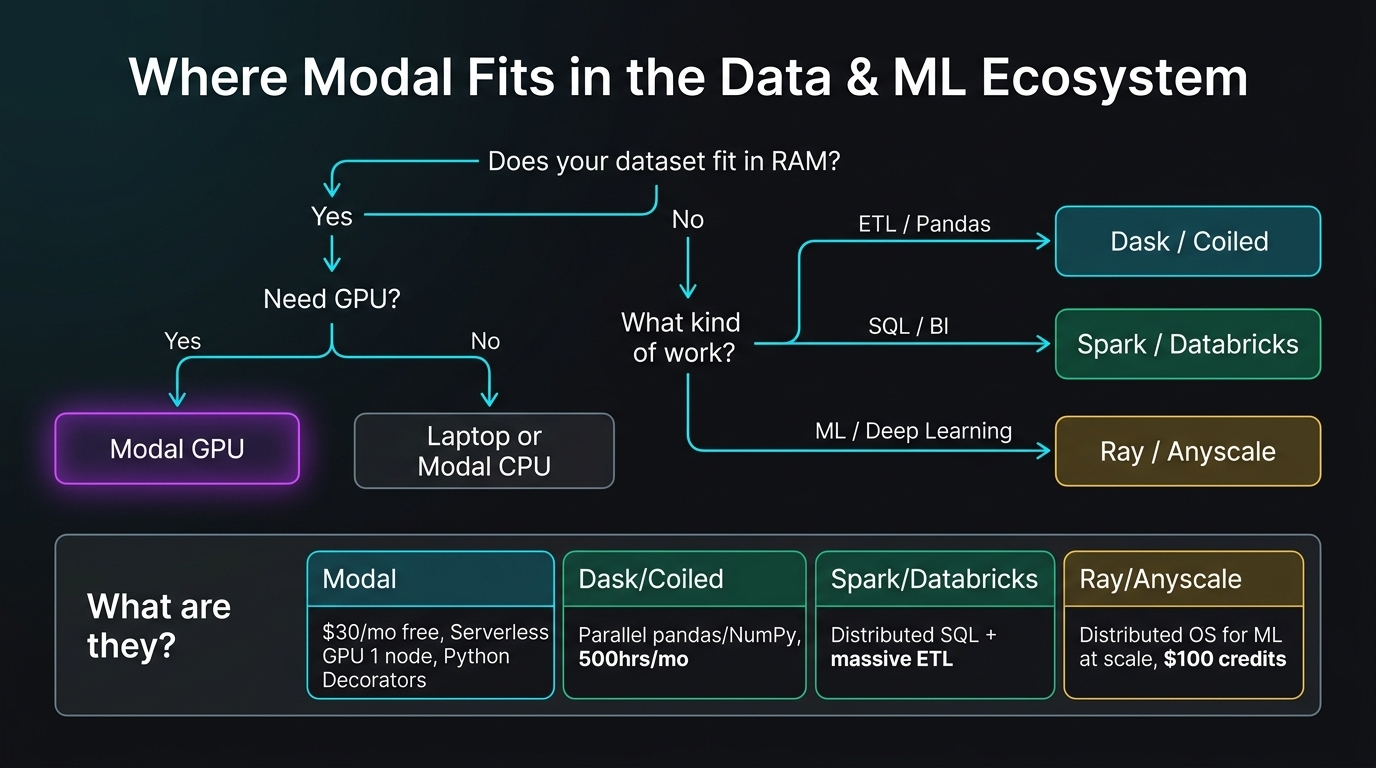
Modal is one piece in a larger landscape. Here’s how the major tools relate to each other:
| Tool | What it is | Best for | Complexity |
|---|---|---|---|
| Modal | Serverless GPU, 1 node | Burst GPU tasks, notebooks, fine-tuning | ⭐ Minimal |
| Dask / Coiled | Parallel pandas/NumPy | Bigger-than-RAM DataFrames, ETL | ⭐⭐ Medium |
| Spark / Databricks | Distributed SQL engine | Data lakes, petabyte-scale ETL, BI | ⭐⭐⭐ High |
| Ray / Anyscale | ML-native distributed OS | Multi-node training, LLM serving, RL | ⭐⭐⭐ High |
Your data fits in RAM and you just need GPU?    → Modal
Your pandas pipeline ran out of memory but you just need SQL?    → DuckDB (yes, it's really that fast)
Your pandas pipeline ran out of memory and you need pandas API?    → Dask / Coiled
You have a data lake and need SQL at scale?    → Spark / Databricks
You're training LLMs across 64 GPUs with distributed strategies?    → Ray / Anyscale
It all fits on your laptop?    → Don't over-engineer it.
🦆 Why DuckDB? DuckDB is an in-process analytical database that spills to disk automatically when data doesn’t fit in RAM. You query it with standard SQL, it runs columnar-vectorized (think: faster than pandas for aggregations), and it installs with a single
pip install duckdb. For datasets up to a few hundred gigabytes, it often outperforms Spark on a single machine. It doesn’t do GPUs — that’s Modal’s job — but for CPU-bound analysis on bigger-than-memory tabular data, DuckDB is the simplest tool that works.
For my Data Science master’s, Modal covers the GPU side and my laptop handles everything else. The $30/month free credit covers all my experiments, and when I’m not running anything, I pay exactly zero. If I ever hit a dataset that doesn’t fit in RAM (50GB+), Dask is the natural next step. Ray and Spark are for when you’re building production ML platforms — they’re overkill for coursework.